
Embed the viewer
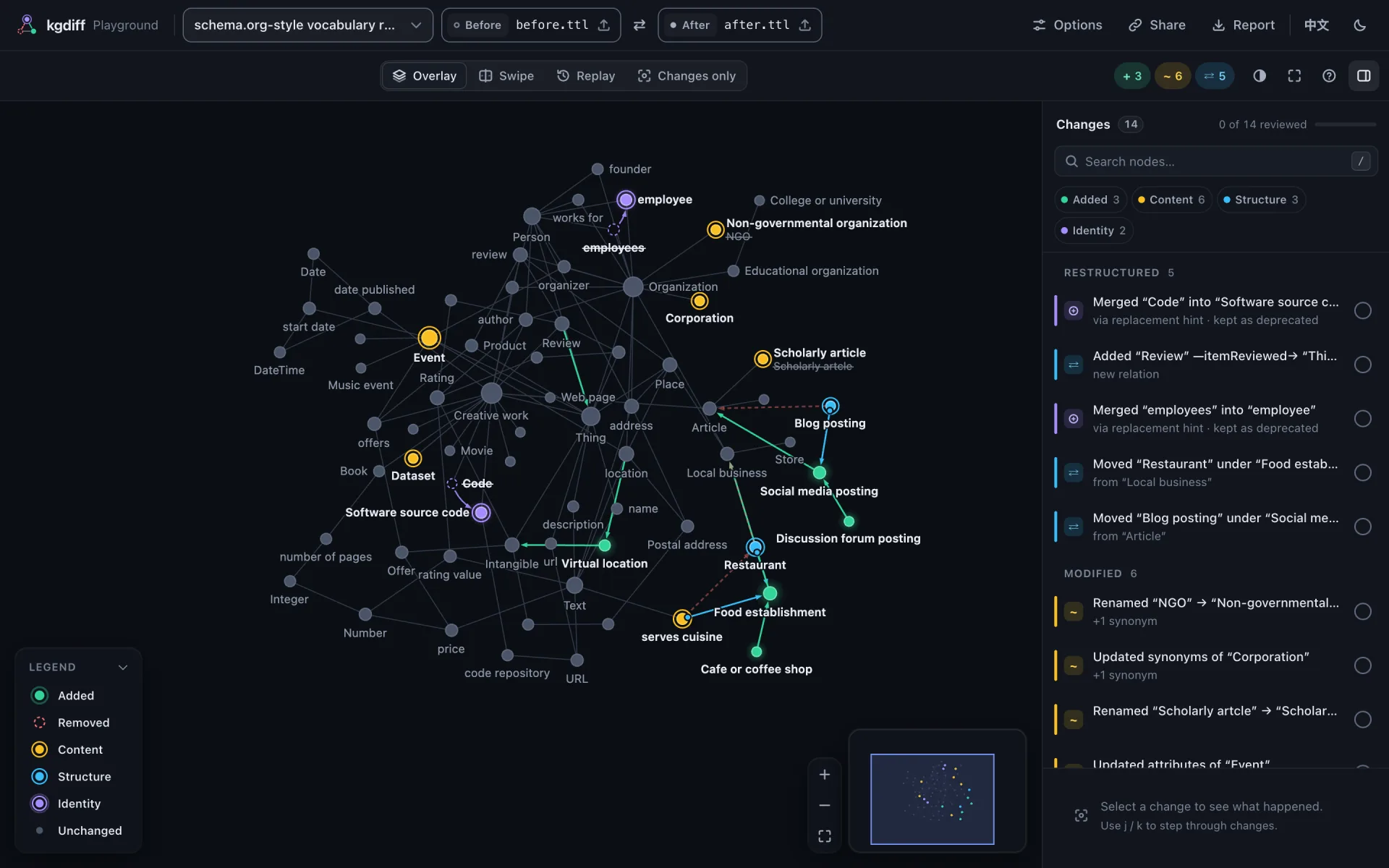
<kgdiff-viewer> is a web component: one custom element that works with any framework, or none. It is the same viewer as in the HTML reports and the playground.
Install
npm install @kgdiff/viewerThe package is ESM only and runs in evergreen browsers.
Show a diff
<kgdiff-viewer theme="auto" style="height: 640px"></kgdiff-viewer>

<script type="module">
  import '@kgdiff/viewer'; // defines <kgdiff-viewer>

  const viewer = document.querySelector('kgdiff-viewer');
  const text = async (url) => (await fetch(url)).text();
  await viewer.load({
    before: { text: await text('/graphs/v1.ttl'), filename: 'v1.ttl' },
    after: { text: await text('/graphs/v2.ttl'), filename: 'v2.ttl' },
  });
</script>
Give the element a height. load() takes each side as one of:
{ text, filename }: parsed with@kgdiff/formats, the format detected from the file name and the content;parsepasses parser options;- a graph object
{ nodes, edges }in kgdiff JSON; - a normalized graph from
@kgdiff/core.
Optionally, diff passes diff options (matching, hierarchy predicates, ignored attributes), names the names of the two sides and title a title. The parsers, the diff engine and the layout are loaded on demand, so they stay out of your initial bundle.
Listen and control
viewer.addEventListener('kgdiff-ready', (event) => console.log(event.detail.stats));
viewer.addEventListener('kgdiff-select', (event) => console.log(event.detail.hunk));

viewer.next(); // select the next change
viewer.mode = 'replay';
viewer.play();| Attribute | Values | Default |
|---|---|---|
mode | overlay, swipe, replay, changes | overlay (changes if large) |
theme | auto, light, dark | auto |
palette | default, colorblind | default |
locale | en, zh-CN | from navigator.language |
sidebar | open, closed | |
sync-hash | boolean: deep links #kgdiff=hunk:<id>;mode:<mode> | |
global-shortcuts | boolean: shortcuts work when nothing on the page has focus | |
header | compact: no brand or graph names, when your page shows them | |
chrome | none: the graph alone, for small embeds | full |
legend | auto, full, mini (one line), none | auto |
loop | boolean: the replay plays by itself, over and over | |
loop-delay | ms between the end of a looping replay and its restart | 1200 |
pause-on-hover | false: a looping replay keeps playing under the mouse | pauses |
mode, theme, palette, locale, chrome, legend, loop, loopDelay and pauseOnHover are also properties. Methods: load(), selectHunk(id), next(), prev(), play(), pause(), fit({ animate, padding }), exportDelta(), reviewState() and setReviewed(id, reviewed). Events, all bubbling and composed: kgdiff-ready { stats }, kgdiff-select { hunk, node }, kgdiff-mode { mode }, kgdiff-review{ hunk, reviewed, progress }, kgdiff-error { error } and kgdiff-replay-end { loop }. Viewer: interaction and API has the details.
Embed a small looping replay
To show a graph's changes as a small strip on another page, leave the review UI out and let the replay loop:
<kgdiff-viewer mode="replay" chrome="none" loop style="height: 320px"></kgdiff-viewer>chrome="none" keeps the graph, its hover tooltip and a one-line legend; the header, change list, step caption, playback bar, zoom buttons and minimap go, clicks and shortcuts do nothing and the view stays fitted, labels included: no name is cut at the edge. loop replays the changes, pausing loop-delay ms (1.2 s) between rounds and while the mouse is over the graph. kgdiff-replay-end fires at the end of every round.
Keep review progress
The viewer remembers in the browser which changes were marked reviewed. To keep that progress somewhere else, such as your backend, listen to kgdiff-review and restore it with setReviewed():
viewer.addEventListener('kgdiff-review', (event) => save(event.detail.progress.reviewed));
viewer.addEventListener('kgdiff-ready', async () => {
  for (const id of await loadSaved()) viewer.setReviewed(id, true);
});
React
Use a ref to call load() and to listen to events:
import '@kgdiff/viewer';
import { useEffect, useRef } from 'react';

export function GraphDiff({ before, after, onSelect }) {
  const viewer = useRef(null);

  useEffect(() => {
    viewer.current.load({ before, after });
  }, [before, after]);

  useEffect(() => {
    const element = viewer.current;
    const listener = (event) => onSelect(event.detail.hunk);
    element.addEventListener('kgdiff-select', listener);
    return () => element.removeEventListener('kgdiff-select', listener);
  }, [onSelect]);

  return <kgdiff-viewer ref={viewer} theme="auto" style={{ height: 640 }} />;
}
In TypeScript, declare kgdiff-viewer in JSX.IntrinsicElements; the package exports the element's type as KgdiffViewerElement.
Vue
Tell Vue that kgdiff-* tags are custom elements, in vite.config.js:
import vue from '@vitejs/plugin-vue';

export default {
  plugins: [
    vue({ template: { compilerOptions: { isCustomElement: (tag) => tag.startsWith('kgdiff-') } } }),
  ],
};
then use it like any element:
<script setup>
import '@kgdiff/viewer';
import { onMounted, ref } from 'vue';

const props = defineProps(['before', 'after']);
const emit = defineEmits(['select']);
const viewer = ref(null);

onMounted(() => viewer.value.load({ before: props.before, after: props.after }));
const onSelect = (event) => emit('select', event.detail.hunk);
</script>

<template>
  <kgdiff-viewer ref="viewer" theme="auto" style="height: 640px" @kgdiff-select="onSelect" />
</template>
Without a bundler
@kgdiff/viewer/standalone (dist/standalone/kgdiff-viewer.js) is a classic script that defines the element and shows precomputed diffs: it is what the HTML reports of the CLI embed. With its compute add-on, @kgdiff/viewer/standalone/compute (kgdiff-viewer-compute.js), it can also load() graph objects ({ nodes, edges }). Parsing text in the browser needs the ESM package and a bundler.
Large graphs
For large graphs the viewer opens in Changes only, which lays out the changes and their neighbourhood instead of the whole graph. Computing a big diff and its layout takes time in the browser; the CLI's HTML report does that work ahead of time and opens instantly.